FAQ
Search
-
What are these sections and articles doing here?
This FAQ is a section in the General category of your help center knowledge base. We created this category and a few common sections to help you get started with your Help Center.
The knowledge base in the Help Center consists of three main page types: category pages, section pages, and articles. Here's the structure:
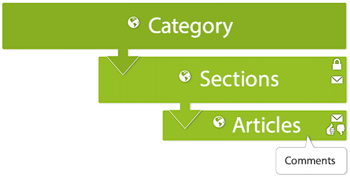
You can create your own categories, sections, and articles and modify or completely delete ours. See the Organizing knowledge base content and Creating articles in the Help Center to learn how.
-
How can agents leverage knowledge to help customers?
You can use our Knowledge Capture app to leverage your team’s collective knowledge.
Using the app, agents can:
- Search the Help Center without leaving the ticket
- Insert links to relevant Help Center articles in ticket comments
- Add inline feedback to existing articles that need updates
- Create new articles while answering tickets using a pre-defined template
Agents never have to leave the ticket interface to share, flag, or create knowledge, so they can help the customer, while also improving your self-service offerings for other customers.
To get started, see our Knowledge Capture documentation.
And before your agents can start creating new knowledge directly from tickets, you’ll need to create a template for them to use. To help you along, we’ve provided some template ideas below. You can copy and paste any sample template below into a new article, add the KCTemplate label to the article, and you’ll be all set.
Q&A template:
[Title]
Question
write the question here.Answer
write the answer here.Solution template:
[Title]
Symptoms
write the symptoms here.Resolution
write the resolution here.Cause
write the cause here.How-to template:
[Title]
Objective
write the purpose or task here.Procedure
write the steps here. -
How do I customize my Help Center?
You can modify the look and feel of your Help Center by changing colors and fonts. See Branding your Help Center to learn how.
You can also change the design of your Help Center. If you're comfortable working with page code, you can dig in to the site's HTML, CSS, and Javascript to customize your theme. To get started, see Customizing the Help Center.
-
How do I publish my content in other languages?
If you have configured your Help Center to support multiple languages, you can publish content in your supported languages.
Here's the workflow for localizing your Help Center content into other languages:
- Get your content translated in the other languages.
- Configure the Help Center to support all your languages.
- Add the translated content to the Help Center.
For complete instructions, see Localizing the Help Center.
-
Maintenance Tips for Cannondale Mountain Bikes
Introduction:
Regular maintenance keeps your Cannondale mountain bike performing at its best and extends its lifespan. This guide provides easy-to-follow maintenance tips suitable for self-service.Basic Maintenance Checklist
-
Clean Your Bike Regularly
- Use mild soap and water with a sponge or soft brush.
- Avoid high-pressure water as it can force dirt into bearings.
- Dry your bike thoroughly after cleaning.
-
Lubricate the Chain and Drivetrain
- Clean chain with a degreaser periodically.
- Apply bike-specific lubricant to chain links.
- Wipe off excess lube to avoid attracting dirt.
-
Inspect Tires and Wheels
- Check tire pressure before each ride; recommended psi is on the tire sidewall.
- Look for cuts, embedded debris, or worn tread.
- Ensure wheels spin smoothly and are true (not wobbling).
-
Check Brakes
- Inspect brake pads for wear; replace if less than 1.5mm thickness.
- Test brake lever feel—should engage without excessive travel.
- For hydraulic brakes, periodically check for fluid leaks and have them serviced by a professional if needed.
-
Suspension Maintenance
- Clean suspension forks and rear shocks regularly.
- Avoid stalling dirt and grime on stanchions.
- Follow manufacturer’s schedule for suspension servicing or send to authorized Cannondale service centers.
Tools Recommended for Self-Service
- Allen key set (usually 4mm, 5mm, 6mm)
- Tire pump with pressure gauge
- Chain lubricant and degreaser
- Bike stand (optional but helpful)
- Torque wrench for critical bolts
- Tire levers and patch kit for quick repairs
When to Seek Professional Service
- After a crash or impact
- Persistent brake or shifting issues
- Suspension rebuilds or complex bearing service
- Frame cracks or component damage
Authorized Cannondale dealers and service centers have certified technicians familiar with Cannondale's components and warranty services.
Helpful Resource:
Visit Cannondale’s official maintenance and support pages here: https://www.cannondale.com/en-us/support
-
Clean Your Bike Regularly
